SOFTWARE - [KML Generator]
A friend of mine started geotagging all of his photos. This friend wanted to be able to show the location of all his pictures on Google-Earth [External], a program that can be used to view satellite imagery from everywhere on earth. I figured the easiest way to do this was to construct my own Google Earth file that contained all of his data.
I'll first explain in short what geotagging means: Geotagging is a process where you add the exact coordinates (GPS) to the photo. The coordinates will then be stored inside the JPG file in a section which is called the 'Exif'. The advantage in doing so is: You still can see the exact location of a photo even if it was taken years ago.
Google Earth has its own file types (.KML). These files can contain data that can be opened on the Google map. Examples of this data are: tracks (route logs), waypoints, markers, ...
If I was going to build a tool for my friend all I needed to do was to find out how the .KML files are constructed. It turned out they are very easy to understand. All I needed to do was to build a tool that can read the Exif tags from all JPG images in a certain folder. Then I had to find the GPS informations inside these Exif tags, if there were any. Only thing that's left now is to write the resulting data to a Google-Earth file.
The result of my work is the program Exif to Google-Earth converter. The work flow is very easy:
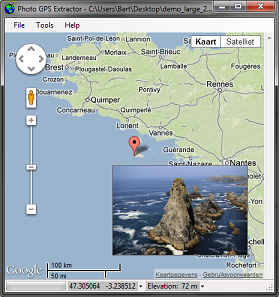
The result is a .KML file that can be opened with Google Earth. Once opened you will see a map with a marker on all the places where a picture was taken. If you click a marker you can see the picture itself.
Optionally you can also add the track log, if available, to the file. A track log is a file that is created by the GPS devices. It shows the exact route you walked or drove. Many Garmin GPS units, even for automotive applications, store the track log by default. You can download this log from the device by connecting it to your computer. Track logs are often stored as .GPX files.
| Developed in: | Visual Basic 5.0 Professional |
| Download type: | Zipped Setup |
| License: | Freeware |
| Size: | 2.1 MB |
| Source code: | not available |
| MD5 Checksum: | 261def840dc67738db568310706ee4b7 |
I got a request to add an additional feature: you now include sub folders when searching for JPGs. I didn't add this feature to the first download as it is still in Beta testing. You can download this file and replace the original executable with this executable.
| Developed in: | Visual Basic 5.0 Professional |
| Download type: | Zipped Executable |
| License: | Freeware |
| Size: | 62 kB |
| Source code: | not available |
| MD5 Checksum: | d9a36645fa3c6ec2a113c589eb136ebb |
Copyright ©1998-2012 Vanderhaegen Bart - last modified: January 22, 2012