
Logo Banner

ELECTRONICS - [BK1786B software]
BK Precision - BK1786B Software

Introduction to the BK1786B

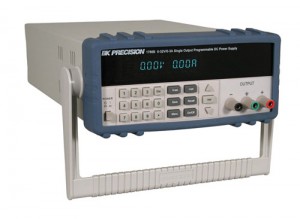
I recently acquired a BK Precision programmable power supply [External] BK Precision programmable power supply, type BK1786B. This is a DC power supply which can output voltages between 0 and 32 VDC, with an output current of up to 3 A.

The supply unit is completely digital and programmable: you can enter the desired voltage/current configuration by entering the values on a numeric keypad. You can enter values with a resolution of 10 mV/10 mA so it is quite accurate.

This kind of units is especially interesting for labo experiments, where you slowly need to increase the voltage between 0 and ... V. Of course there are so many other applications where you could use a programmable supply.

The BK1786B comes with an RS-232 connection, meaning you can connect to it with a computer. It comes with some software you can use to view, change, log the outputs. You can also setup testing programs for hardware.

The communication protocol is described in the manual: it describes everything you need to know to create your own software for the power unit. So I decided to try my own application for the BK1786B...

My first BK1786B software

My first BK1786B software is a small tool which outputs a sound when the power supply's output current reached the maximal preset current. To do this, my software will poll the BK1786B every 100 milliseconds. It will show the output state (ON/OFF) and show if the maximal current is reached (YES/NO). Then the software also generates a sound tone, but only when you checked the checkbox "Activate Sound Alert".

You don't need to set any values in the software: it only reads the data from the BK1786B unit. The maximal current is set on the BK1786B itself. You should consider this software as a small add-on for an extra functionality.

I use this software for the testing of my prototype electronic circuits: when testing a circuit for the first time I usually set a very low maximal output current (e.g. 10 mA). This can prevent components get burned when something is wrong with the circuit (overcurrent/short circuit). I figured it would be handy to have an alert when the current limit was reached, so I made this software ...

Download

Here you can download a zip with the executable and the source code for this project. The program is written in vb.net express 2010, for the .NET framework 3.5. You need to have this framework installed before you can use the software.

Developed in: Visual Basic .NET Express 2010
Download type: Zipped Executable + Source
License: Freeware
Size: 34.2 kB
Source code: Included
MD5 Checksum: 8dc66c6fd0dc34946d58407251c37789

The software comes without any warranties: it works very well on my BK1786B instrument but it was tested on a single computer only. Any feedback is greatly appreciated.

Current Limiting

The BK1786B is a programmable power supply with a current limiting feature. It will only deliver the desired output voltage when the maximal current isn't exceeded. Then the unit is in CV mode (Constant Voltage Mode), which is indicated on the LCD.

Once the output current exceeds the maximal current, the unit will go into CC mode (Constant Current Mode). Now the unit will limit the output current to the preset value. It does that by lowering the output voltage to the appropriate level.

Copyright ©1998-2012 Vanderhaegen Bart - last modified: February 17, 2012