
Velleman K8000 - [K8000 Applications] - [K8000 Speech Recognition]
Speech Recognition is a rather complicated technology. Luckily there are libraries you can add to your existing programs. With the use of these libraries Speech Recognition becomes relatively easy.
For Visual Basic there is a Speech Recognition component you can add to a form of one of your Windows. It goes the same way as adding a button or a list. The component handles all the difficult tasks. You only need to add a few lines of source code to create your first speech-enabled application.
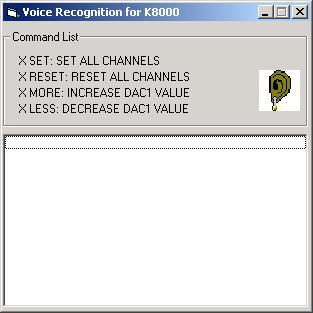
This page describes a little project that demonstrates the use of Speech Recognition. The picture at the left shows a screenshot of it.
The demo uses speech recognition to control your K8000 with voice commands. Unfortunately the only supported language is English but since you are reading this page this probably is not a big issue for you.
Every command is preceded by the letter X. This makes sure the program recognizes it as a K8000 command. For now there are only 4 different commands available: SET, RESET, LESS and MORE.
You can download the Visual Basic 5 source code here. Please keep in mind this only is a demo program. It was written in Visual Basic 5 so it is quite old. I am not sure if it is still working: it depends if the components are still supported by Microsoft/Windows. You need to download an ActiveX control from the Microsoft site: Microsoft Speech Recognition Engine [External].
Copyright ©1998-2022 Vanderhaegen Bart - last modified: August 24, 2013
